Docs · Workspaces
Branch merging
Working with versioning typically means creating a feature branch to make changes on, then merging that branch into a target branch when complete, this allows you to make significant changes without affecting the original branch, allowing you to preserve a known good working configuration and only update it once you are confident that your changes are ready.
Starting a merge
To merge a branch:
- Open the VCS Panel in the workspace toolbar.
- Open the menu options and select Merge Branch.
- Choose your source branch and confirm the target branch.
- Select your Merge Strategy and confirm the merge.
Basic vs Advanced
Basic mode
Basic will present you with the simplified choice of either keeping or discarding your source branch.
- Keep source branch - is most commonly used if you are running parallel branches (typically a
mainand adev), and you want to update your stable branch with the new commits, and then continue working. Selecting this option will use aFast-forwardmerge strategy and preserve individual commits which were made. - Delete source branch - is best practice for feature work or bug fixes, where the work is considered complete and you are unlikely to continue working on the branch. Selecting delete branch will use a
Squashmerge strategy, transforming all the new commits from your branch and turning them into one consolidated commit on the target.
Advanced mode
Advanced will present you with more granular options for your merge, allowing you to separately select a merge strategy (below) and whether you want to delete the source branch.
Merge Strategies
Toca provides three merge strategies depending on how you want your commit history structured.
1. Squash Merge (Recommended for merging into main)
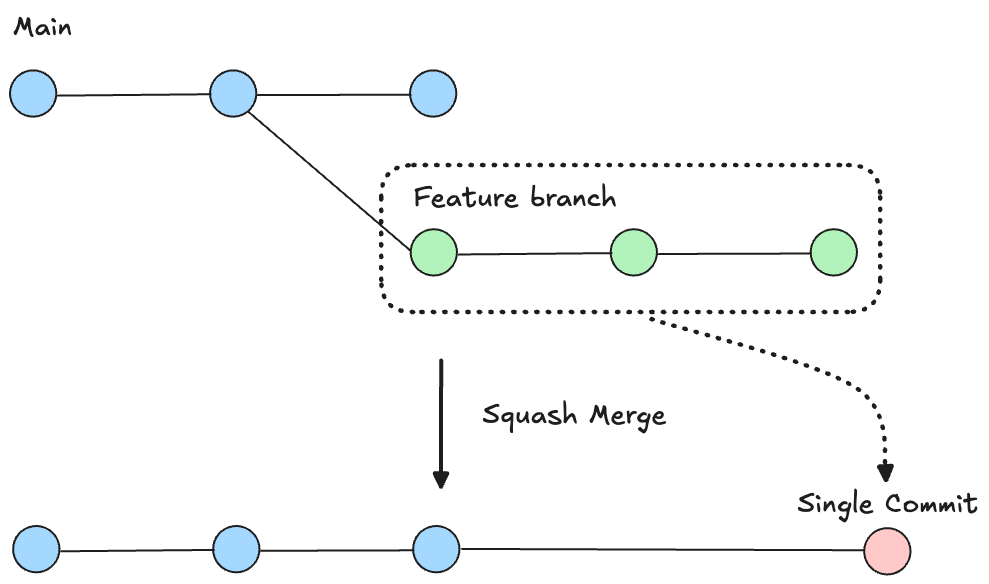
A squash merge takes all the individual commits on your source branch and condense them into a single, cohesive commit on the target branch. There is an option to delete your source branch after completing a squash merge, this is recommended to keep your workspace tidy.
- Why use it: Feature branches often contain messy interim commits (e.g. "Fix typo", "Adjust navbar margin", "Test connector response"). Squashing bundles all of these into one clean record, such as "Address user feedback".
- Best for: Merging completed feature branches or bug fixes into
mainto keep your production commit history tidy and easy to audit.
2. Fast-Forward
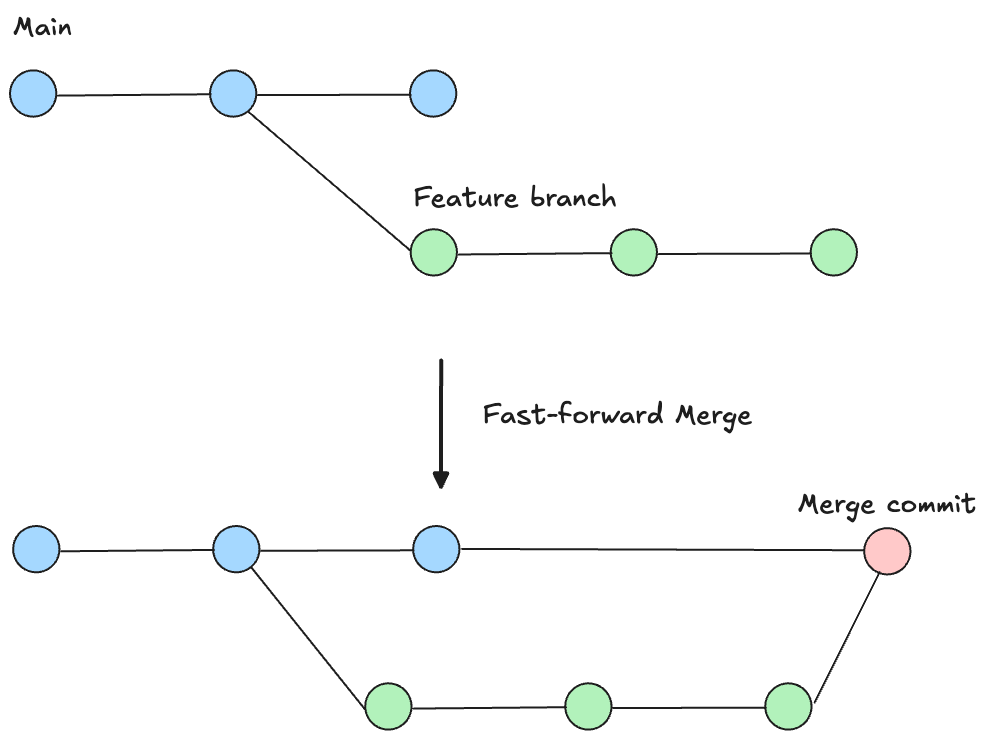
A fast-forward merge moved the target branch pointer directly forward to match the source branch, preserving every individual commit in chronological order without creating a separate merge commit.
- Why use it: It maintains the full, granular step-by-step history of how the work was developed.
- Best for: Merging feature branches into one another when multiple developers are collaborating on the same large initiative and need full visibility into every intermediate change.
3. Rebase (Advanced - main only)
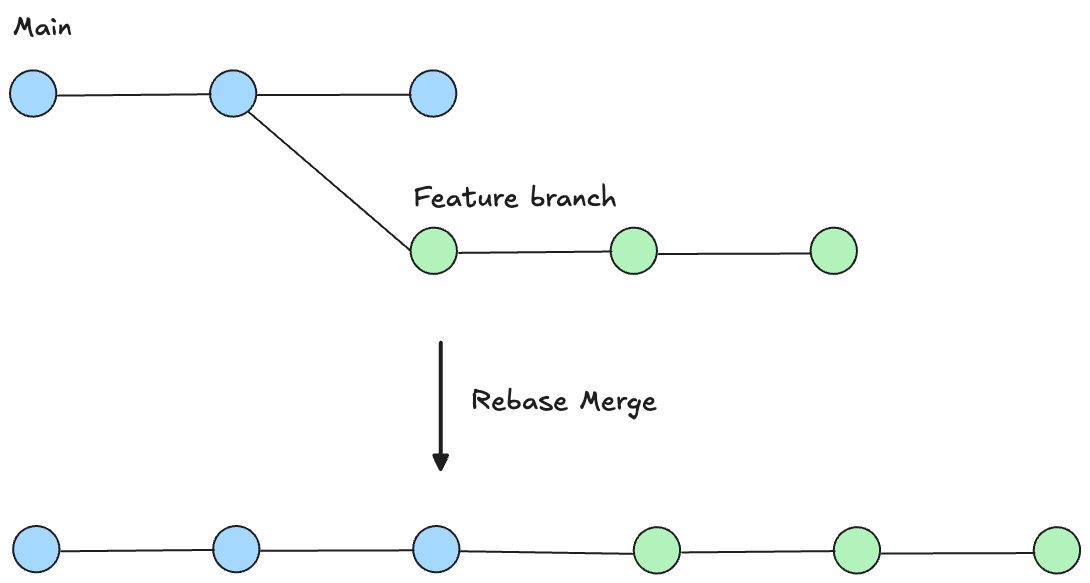
Rebasing takes the commits from your branch and replays them one-by-one directly on top of the latest commit on the target branch. In Toca, rebasing is an advanced workflow restricted strictly to merging into main.
- Why use it: It creates a perfectly straight, linear project history without merge commit bubbles, making it straightforward to trace history or bisect regressions
- When to be careful: Because commits are rewritten and re-applied sequentially, conflicts must be resolved commit-by-commit rather than all at once.