
Docs · Guide
Using Linked Data
So far in this chapter, we've looked at how you can create, link and query data, now let's take a look at where we can use this related data. Before we dive into how and where we can use it, let's first come up with an example scenario with some linked data.
Building the Example
Let's imagine we have a table of Customers, a table of Orders and finally a table of Addresses. If you've followed along with the previous articles in this chapter such as Linking Data, then you'll have already built this example.
Creating the Data
We start with our table of customers:
| Id | Name | Email address | Profile picture | Date of birth |
|---|---|---|---|---|
| 1 | Alan Turing | alan@computers.inc | 💻 | 1912-06-12 |
| 2 | Tim Berners-Lee | tim@worldwideweb.com | 🌐 | 1955-06-08 |
| 3 | Linus Torvalds | linus@linux.net | 🐧 | 1969-12-28 |
Next, we create our table of addresses:
| Id | Address Line 1 | Address Line 2 | City | Area Code |
|---|---|---|---|---|
| 50 | Bletchley Park | Milton Keynes | Buckinghamshire | MK3 6EB |
| 42 | CERN 1211 | Esplanade des Particules 1 | Geneva | 1217 |
| 64 | University of Helsinki | Yliopistonkatu 4 | Helsinki | 00100 |
Last, we have our table of Orders:
| Id | Product | Category | Amount (GBP) | |
|---|---|---|---|---|
| 987 | Engima Cracking Kit | Electronics | 99.99 | |
| 988 | Turing Machine Parts | Electronics | 25.50 | |
| 546 | Guide to the Internet | Books | 74.99 | |
| 547 | How to build your first website | Books | 24.99 | |
| 548 | Server for website | Computing Hardware | 24.99 | |
| 321 | Guide to Microsoft Windows | Books | 0.99 | |
| 322 | Guide to MacOS | Books | 1.99 | 3 |
| 322 | How to build an Operating System | Books | 5.99 |
Linking the Data
Now, currently these tables are not linked, so to make this a varied example, we'll link the data as follows:
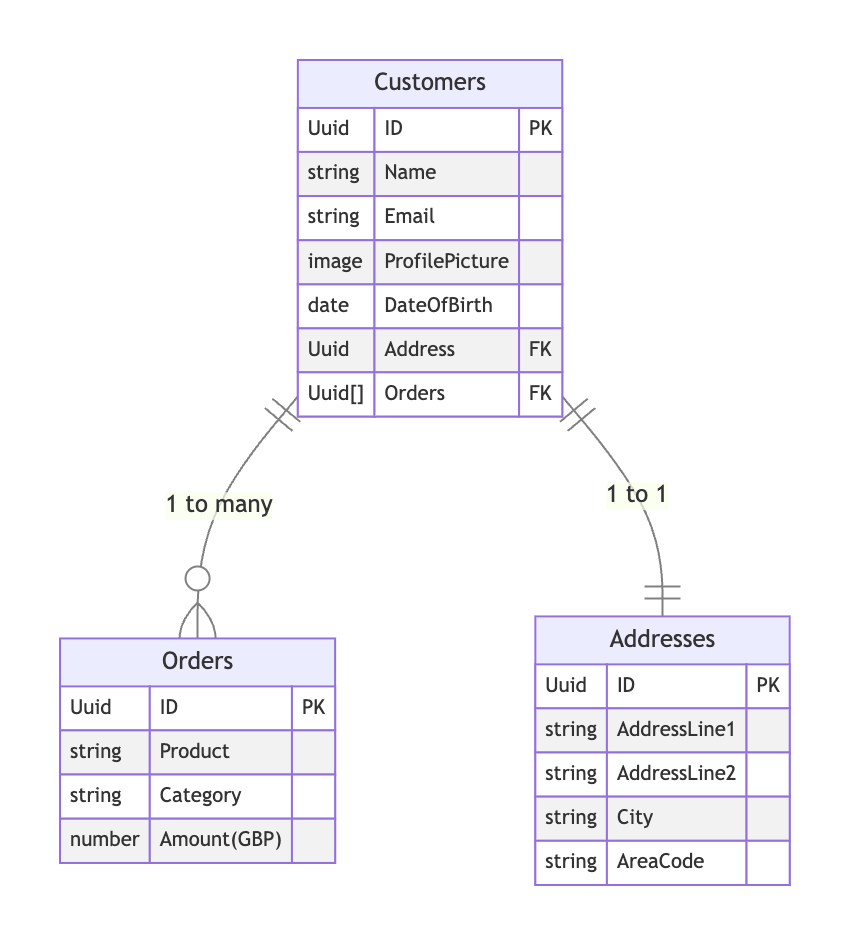
Have a look at the Linking Data article for more information on how to link the data in this way.
Now that we have our linked data, let's take a look at how it can be used!
Apps
When a table with relationships is pulled through to an app, it will not only pull the table you are requesting, but it will also pull all the related data too. The way to think about this is that instead of pulling the data in a tabular format, the data comes back as a JSON object with nested data. This means that instead of having to make separate requests for the related data, you have all the data you need at your finger tips.
Let's break this down so we can understand this better.
If we have a customer:
| Id | Name | Email address | Profile picture | Date of birth | Address | Orders |
|---|---|---|---|---|---|---|
| 1 | Alan Turing | alan@computers.inc | 💻 | 1912-06-12 | 50 | [987, 988] |
You might think that this would be returned the app like so:
{
  "Id": 1,
  "Name": "Alan Turing",
  "Email address": "alan@computers.inc",
  "Profile picture": "https://link.to/download-image",
  "Date of Birth": "19120612T00:00:00Z",
  "Address": 50,
  "Orders": [
    987,
    988
  ]
}
But if data was returned like this, you'd have to separately query the address table where Id = 50 to fetch the relevant address information and then you'd have make another query to the orders table where Id IN [987, 988] to get back the corresponding orders. This would be pretty tedious and take a lot of time.
Luckily, Apps are a bit smarter than that and they natively understand the relationships in tables so they actually return the data like so:
{
  "Id": 1,
  "Name": "Alan Turing",
  "Email address": "alan@computers.inc",
  "Profile picture": "https://link.to/download-image",
  "Date of Birth": "19120612T00:00:00Z",
  "Address": {
    "Id": 50,
    "Address Line 1": "Bletchley Park",
    "Address Line 2": "Milton Keynes",
    "City": "Buckinghamshire",
    "Area Code": "MK3 6EB"
  },
  "Orders": [
    {
      "Id": 987,
      "Product": "Enigma Cracking Kit",
      "Category": "Electronics",
      "Amount (GBP)": 99.99
    },
    {
      "Id": 987,
      "Product": "Turing Machine Parts",
      "Category": "Electronics",
      "Amount (GBP)": 25.5
    }
  ]
}
As the data is returned like this, it allows us to do things like query the table by a value on one of the related tables, or have a repeating layout inside a repeating layout to display a list of customers and then a list of orders for each customer, all whilst only having to fetch the data once.
Dynamic Pages and Repeating Layouts
One of the best places to take advantage of how related data is handled in Apps is dynamic pages. Imagine we're building out the admin side of an eCommerce application and we need to be able to see all customers and their details. You might:
- Construct an admin page which has a repeating layout which is driven by the Customers table
- For each item in your repeating layout, you'd have a Link Button that links to a dynamic page
- The dynamic page would also be driven by the Customers table
- The dynamic page could then have:
- A section for the personal information of the customer at the top of the page
- A section on the page for the address of the customer
- A repeating layout underneath the personal and address information which is driven from the list of Orders that has been returned alongside the customer information
Other places you can use related data in Apps
Dynamic Data Wrapper and Query Wrapper
The Dynamic Data Wrapper and Query wrapper components are two components that return table data, the main difference between them being that the Dynamic Data Wrapper component only returns one row of data at a time as context and the Query wrapper component can return many rows of data as context. Both of these components, when they use a table that has related data, will return all the related data as well. This allows you to use components like repeating layouts and table components inside these wrapper components, all without having to request extra data.
Subchips
When you are using a datachip that represents a table, you can drill down to a specific cell using subchips. This is especially powerful when the table you are using has related data as you can use subchips to drill down to a cell inside any of the related tables.
Automation
The way related data is handled in Automation differs to the way it is handled in Apps. In Apps, it makes perfect sense for related data to be represented as a nested JSON object as shown above, but in Automation it would be pretty weird if we used a Get Table Data action and instead of returning a table, it returned a JSON result.
So, in Automation, tables are always represented by a 2D structure (columns and rows). This means that if you were to use a Get Table Data action on the Customers table where Id = 1 then it would return the following data:
| Id | Name | Email address | Profile picture | Date of birth | Address | Orders |
|---|---|---|---|---|---|---|
| 1 | Alan Turing | alan@computers.inc | 💻 | 1912-06-12 | 50 | [987, 988] |
This is much more akin to how a SQL database would behave and so aligns much closer to what users might expect when working on the backend logic. You can then go off and query the related tables further from here.
There is only really one place in Automation where you can access the related data directly from the root table: Querying.
Querying
Automation still understands the relationships between tables, and so when you are querying a table in an action such as Get Table Data, Update Table Rows or Delete Table Rows you can actually query the table by values inside the related tables. Imagine you want to fetch all get all customers where the city they come from is "Geneva". Related data allows you to do this by simply selecting the column in the related table and then defining your query as you normally would.
Referential Integrity
There are other places where related data comes into it's own such as referential integrity. These relationships you define between your data will make sure that you can't do things like delete a customer that is associated to an address or several orders. You first have to delete the related data before you can delete the data at the root. When you link tables you can also take advantage of features such as cascade delete which means that when you delete a row, any rows from related tables associated with the row will also be deleted.