
Docs · Guide
Types of Bots
In Toca, there are two main types of Bots which can run your automation: GUI and Stateless. This section will cover the differences between them and why you might use one over the other.
Before we dive into specifics it is worth covering a bit of technical information that applies to all types of bots. Firstly, a bot is comprised of several applications, all orchestrated by an application we call an Agent. Secondly, a bot can be deployed on Windows (both Desktop and Server variants) or Linux (more specifically an Ubuntu variant). Thirdly, Bots can be deployed in separate locations to your main platform. Bots connect to the main platform (we call this the core) by making an outbound call from the Bot to the core, this means that as long as the core allows inbound traffic from the machines the Bots are deployed on then you can deploy a Bot anywhere. This can be particularly useful if you need to deploy a Bot on a machine within your company network so it has access to various services that it wouldn't normally. Lastly, bots will automatically register themselves into the platform when they first come online and when they go offline (i.e the bot software isn't running or the machine is shut down) the main platform knows that it cannot run automation on these bots and so the automation jobs will fail. The main benefit of this is that you can scale your bots with ease as you just need to deploy more bots and they'll instantly be available to run automation on and then when you no longer need them you can simply decommission the bots.
GUI Bots
GUI stands for Graphical User Interface and the reason these Bots are called this is because they have a desktop environment available. These bots are really designed for desktop automation, also commonly known as Robotic Process Automation (RPA). With these bots you can automate browsers, desktop applications, file systems and more! GUI bots can be deployed on two operating systems: Windows and Linux. Due to the many foibles of the Windows operating system we typically recommend that you only use a Windows bot if you are reliant on Windows only applications in your automation, otherwise use a Linux GUI bot. Certainly, if you're only doing browser automation then you can use linux for this. The main features of a GUI bot can be condensed into the following:
- Used for Desktop automation
- Can run on Windows or Linux desktop environments
- Can only run one automation activity at a time
- Has access to the file system of the machine the bot is deployed on
Due to GUI bots only being able to run one task at a time, if you try running multiple workflows which require the same bot at the same time then the workflows will queue up after one another and then run only after the currently executing workflow finishes.
Stateless Bots
Stateless bots are designed for high volume automation tasks which do not require any form of desktop automation. Stateless bots have no desktop environment and no access to the underlying file system but because of this, they can perform many automation tasks at once. Stateless bots are ideal for making API requests, wrangling data, interacting with databases and much more. When you assign an activity to a stateless bot, it will pick the bot doing the least work at the time, so when you're running lots of tasks, your stateless bots should all being running a similar number of jobs. The main features of Stateless bots are:
- No desktop environment or local file system
- Can run many automation tasks at once
- When an activity or workflow is run, the least busy stateless bot will be picked to run the task
- Can be deployed on Linux or Windows
In general, unless you need a desktop environment to perform desktop automation, you should always use a Stateless bot.
Bot Pools
Bot pools allow you to group together sets of GUI or Stateless bots, you can then assign one of these pools to an activity. When this activity runs it will then pick a bot from that pool to run the automation. This has different benefits depending on whether it is a stateless bot pool or a GUI bot pool. Below are some scenarios where bot pooling can come in useful for each type of bot.
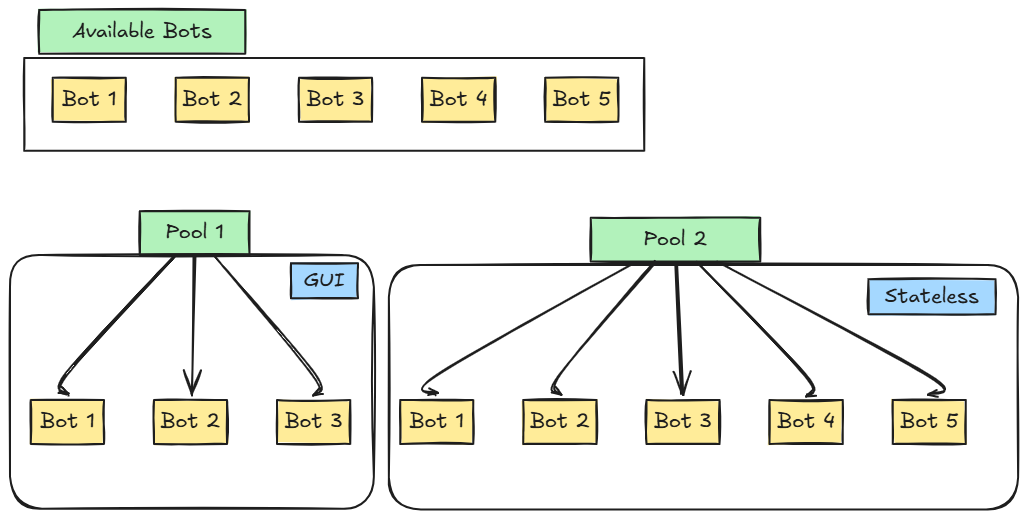
Stateless Bot Pools
- If you have some stateless bots deployed on Linux and some on Windows then you could create a Linux bot pool and a Windows bot pool
- You might have some stateless bots deployed on your internal network so they can access some internal services and some deployed elsewhere. You can then create a pool for the internal bots and a pool for the global stateless bots. This means you can still get the benefits of stateless automation without having to worry about a bot being picked at random and not having access to other services.
GUI Bot Pools
- You want better throughput of your GUI bots so you use a bot pool as at the point of execution it will pick any GUI bot in the pool that is not currently running something. If all GUI bots in the pool are currently running something then it will pick the first one to become available.
- You have some Windows GUI bots and some Linux GUI bots and you want the benefit of bot pooling but you need to segregate the bots by operating system so that file actions work as expected (Windows uses
\as a path separator and linux uses/) and your automation has access to the applications expected. - You have some GUI bots installed on an internal network and some deployed elsewhere and you want to make sure the right activities have access to the required external services