
Docs · Projects
Connectors
Connectors allow you to run the workflow via a HTTP Request, therefore allowing other software to connect to your workflow.
There are two parts to a connector, the handler which takes in the request and the response which forms and generates the response. You can have one handler per connector but there can be many response nodes, as you may want to return different responses based on what happens in your workflow.
The handler defines how the request is received and parsed, allowing query parameters, headers and the request body to be parsed and formatted before being injected into the workflow. The response nodes can have inputs defined so you can return outputs from your activities and use them to form the response.
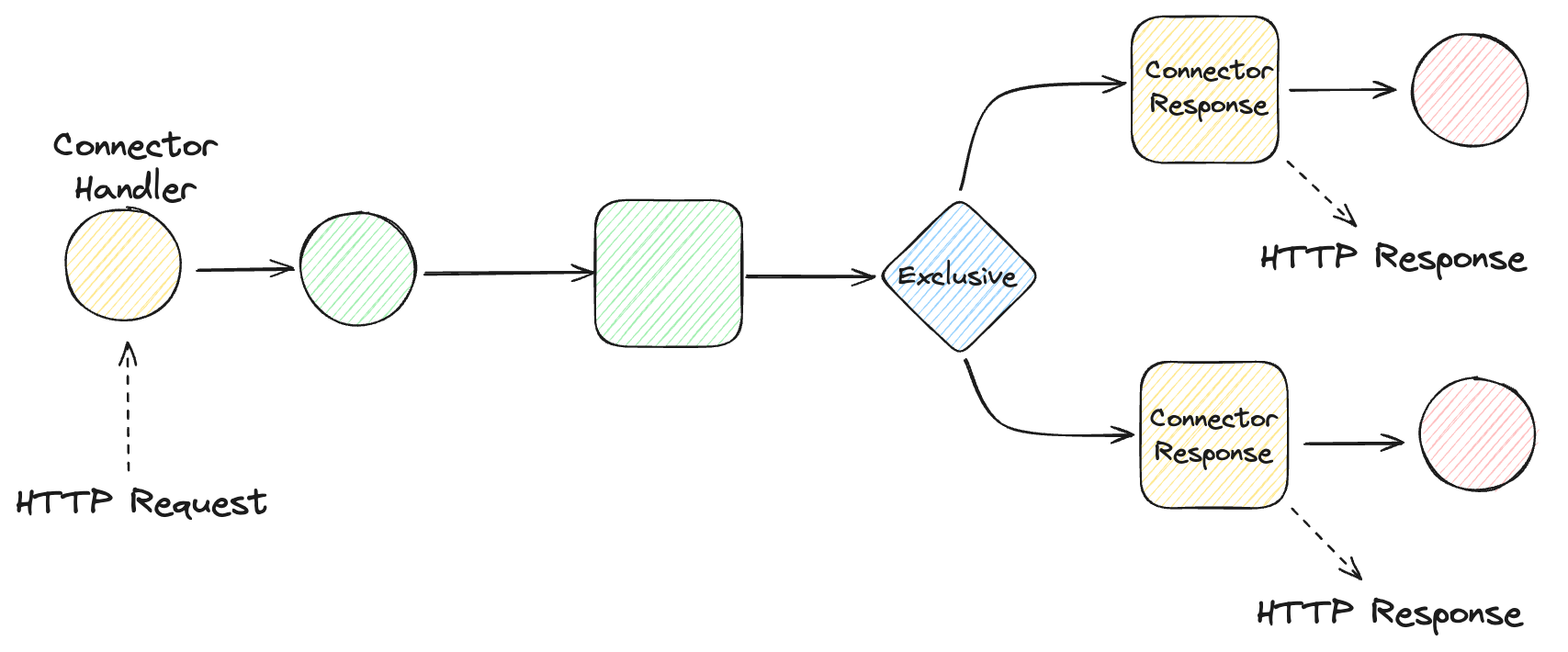
Connectors are conceptually similar to Listeners but with a few key differences:
- Connectors are designed for external use (i.e. an external system making a call to the platform)
- Connectors allow you to define a response
- Connectors can receive a request in any format, it does not have to be a particular model or content type
Toca comes with the following connectors:
- GET - Designed to be used in scenarios where the workflow is returning some data
- POST - Designed for when a workflow is inserting some data
- PUT - Designed for when a worklow is updating data by replacing it
- DELETE - Designed for when a workflow is deleting data
- PATCH - Designed for when a workflow is amending data by adding to it
- UPLOAD - Designed for when you need to upload a file as an input to a workflow
- DOWNLOAD - Designed for when you need to return a file as an response from a workflow
If you want to build your own connector, then you can do so in the TDK.