
Docs · Guide
Using Tables to Structure Data
A table is a data structure that allows you to organize and manage information within your application. Think of it as a spreadsheet within your project, where data is arranged in rows and columns. Each row represents a record, and each column represents a specific attribute or field.
Imagine you want to store some data about your users, we want to store:
- Their name
- Email address
- Profile picture
- Date of Birth
We need to create a table with a column for each of these properties and we can leverage proper data types for each one.
So for a name and email address we can use the Text type in those columns, then for storing the profile picture we'll use an Image type and lastly for the date of birth, we can leverage the Date type. This allows us to store our data for each user in it's most usable form and means we don't have to go and convert any data to store it in the table.
So, our table will then look like the following:
| Id | Name | Email address | Profile picture | Date of birth |
|---|---|---|---|---|
| 1 | Alan Turing | alan@computers.inc | 💻 | 1912-06-12 |
| 2 | Tim Berners-Lee | tim@worldwideweb.com | 🌐 | 1955-06-08 |
| 3 | Linus Torvalds | linus@linux.net | 🐧 | 1969-12-28 |
Tables in the real world
This is great, but in a real world application, the different data we store tends to be related. Think of our table of users, we might also want to store their address, their contact information and their previous orders.
We could create one table that contains all of this data, but that could end up being an incredibly big table which becomes very difficult to manage and maintain over time. Also, how would we represent many previous orders against a single user if it all lived in one table? It would result in an unwiedly table.
| Id | Name | Email address | Profile picture | Date of birth | Address Line 1 | Address Line 2 | City | PostCode / ZipCode | Order ID | Product | Category | Amount (GBP) |
|---|---|---|---|---|---|---|---|---|---|---|---|---|
| 1 | Alan Turing | alan@computers.inc | 💻 | 1912-06-12 | Bletchley Park | Milton Keynes | Buckinghamshire | MK3 6EB | 987 | Engima Cracking Kit | Electronics | 99.99 |
| 1 | Alan Turing | alan@computers.inc | 💻 | 1912-06-12 | Bletchley Park | Milton Keynes | Buckinghamshire | MK3 6EB | 988 | Turing Machine Parts | Electronics | 25.50 |
| 2 | Tim Berners-Lee | tim@worldwideweb.com | 🌐 | 1955-06-08 | CERN 1211 | Esplanade des Particules 1 | Geneva | 1217 | 546 | Guide to the Internet | Books | 74.99 |
| 2 | Tim Berners-Lee | tim@worldwideweb.com | 🌐 | 1955-06-08 | CERN 1211 | Esplanade des Particules 1 | Geneva | 1217 | 547 | How to build your first website | Books | 24.99 |
| 2 | Tim Berners-Lee | tim@worldwideweb.com | 🌐 | 1955-06-08 | CERN 1211 | Esplanade des Particules 1 | Geneva | 1217 | 548 | Server for website | Computing Hardware | 24.99 |
| 3 | Linus Torvalds | linus@linux.net | 🐧 | 1969-12-28 | University of Helsinki | Yliopistonkatu 4 | Helsinki | 00100 | 321 | Guide to Microsoft Windows | Books | 0.99 |
| 3 | Linus Torvalds | linus@linux.net | 🐧 | 1969-12-28 | University of Helsinki | Yliopistonkatu 4 | Helsinki | 00100 | 322 | Guide to MacOS | Books | 1.99 |
| 3 | Linus Torvalds | linus@linux.net | 🐧 | 1969-12-28 | University of Helsinki | Yliopistonkatu 4 | Helsinki | 00100 | 322 | How to build an Operating System | Books | 5.99 |
We can see how storing all of our data for our project in a single table leads to duplicated data, a large table and it doesn't actually represent how we think about this data in real life.
Better ways of storing the data
It would be much better if we could store the data about our users, their addresses, their previous orders and their contact information in separate tables and then just link them to each other. Fortunately, this is where Table Relationships and Views come in handy! These features allow us to express our data in a way that actually makes sense and mirrors the real life representation of data as closely as possible. This means we don't have to perform data transforming gymnastics just to view our table data or to update it.
Let's remodel our data, but using separate tables to store information about our users, their addresses and their orders.
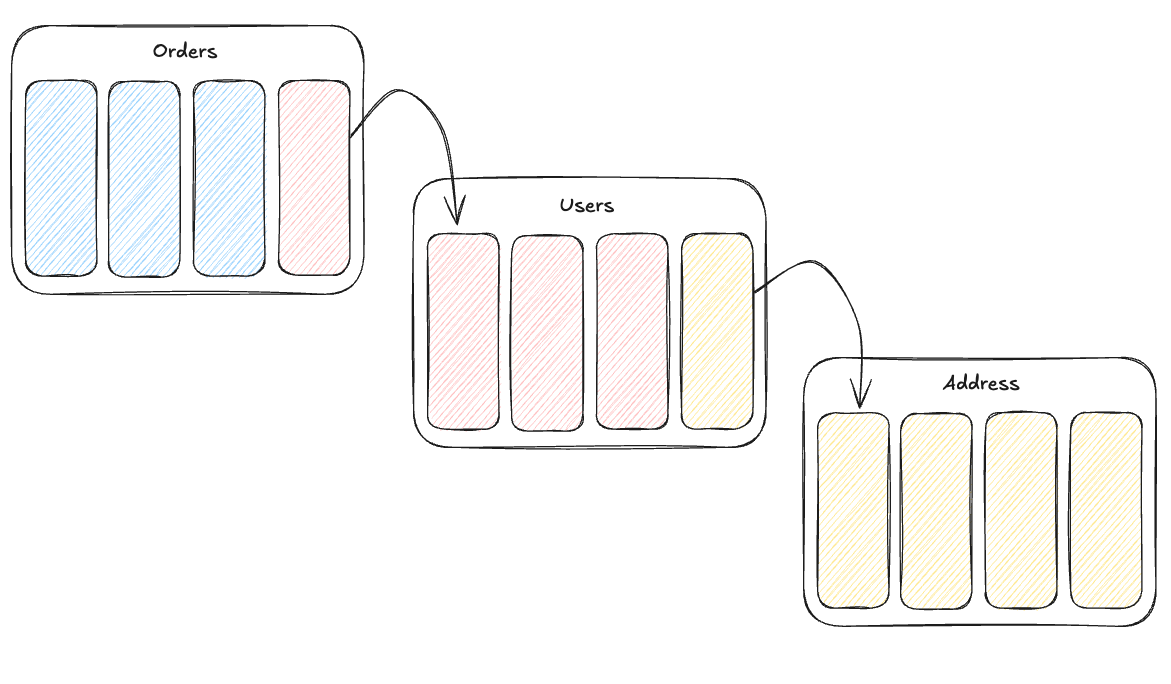
Following the above diagram, our tables now look like this:
Users Table
| Id | Name | Email address | Profile picture | Date of birth | Associated Address |
|---|---|---|---|---|---|
| 1 | Alan Turing | alan@computers.inc | 💻 | 1912-06-12 | 50 |
| 2 | Tim Berners-Lee | tim@worldwideweb.com | 🌐 | 1955-06-08 | 42 |
| 3 | Linus Torvalds | linus@linux.net | 🐧 | 1969-12-28 | 64 |
Address Table
| Id | Address Line 1 | Address Line 2 | City | PostCode / ZipCode |
|---|---|---|---|---|
| 50 | Bletchley Park | Milton Keynes | Buckinghamshire | MK3 6EB |
| 42 | CERN 1211 | Esplanade des Particules 1 | Geneva | 1217 |
| 64 | University of Helsinki | Yliopistonkatu 4 | Helsinki | 00100 |
Orders Table
| Id | Product | Category | Amount (GBP) | Associated User |
|---|---|---|---|---|
| 987 | Engima Cracking Kit | Electronics | 99.99 | 1 |
| 988 | Turing Machine Parts | Electronics | 25.50 | 1 |
| 546 | Guide to the Internet | Books | 74.99 | 2 |
| 547 | How to build your first website | Books | 24.99 | 2 |
| 548 | Server for website | Computing Hardware | 24.99 | 2 |
| 321 | Guide to Microsoft Windows | Books | 0.99 | 3 |
| 322 | Guide to MacOS | Books | 1.99 | 3 |
| 322 | How to build an Operating System | Books | 5.99 | 3 |
We can see that our data is much easier to work with, we don't have duplicate data appearing and the table structures are much more straight forward.
In the next few pages we'll take a look at how we would actually implement something like the above in Toca!