
Docs · Release notes
8.1 - Release Notes
Version 8.1 focuses on improving the navigation around the Toca platform, allowing you to move around the platform faster than ever before. 8.1 also introduces Tocabot, our knowledgeable AI chatbot who can help you with any questions you might have about the platform!
What's New
Apps
There aren't too many changes across the Apps layer in version 8.1, more focus was placed on introducing small improvements across the existing functionality.
Copy App Page
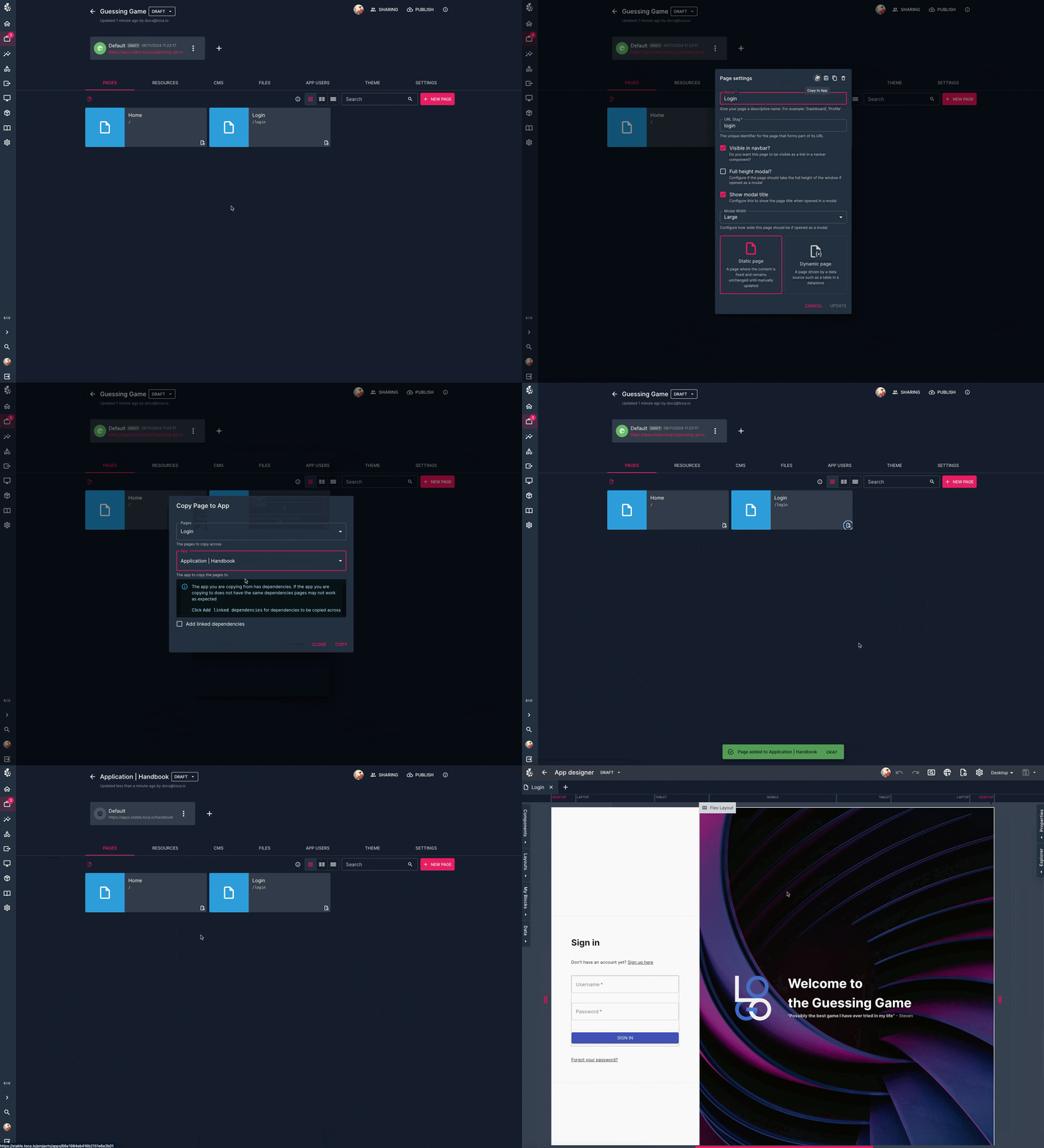
Ever wanted to copy a page you've designed in one App to another? Well, now you can! This new Copy App Page feature allows you to clone a page, dependencies and all, to another app. This allows you to share designs and functionality between apps easily.
Usability Improvements
Similar to automation, we have focused on adding some small usability improvements to the App designer in version 8.1. These should improve your experience building an app and developing in page logic.
- Drag Multiple IPL Nodes: You can now highlight and drag multiple nodes in the IPL designer
- Resizeable App Sidebars: The sidebards that appear in the app designer such as the components sidebar or the properties or explorer sidebar can now be dragged in and out allowing you to size them perfectly for the screen your working on
- Toggle titles in Modals: On the page settings you now have the option to hide the title of the page if the page is going to be used as a modal. This gives you more control to define exactly how a modal looks
Automation
The main change in the automation layer is the introduction of a new feature which allows you to add folders to a datastore, allowing you to treat a datastore as a shared file system. There are also some small improvements to existing functionality in the activity designer.
Directories in Datastores
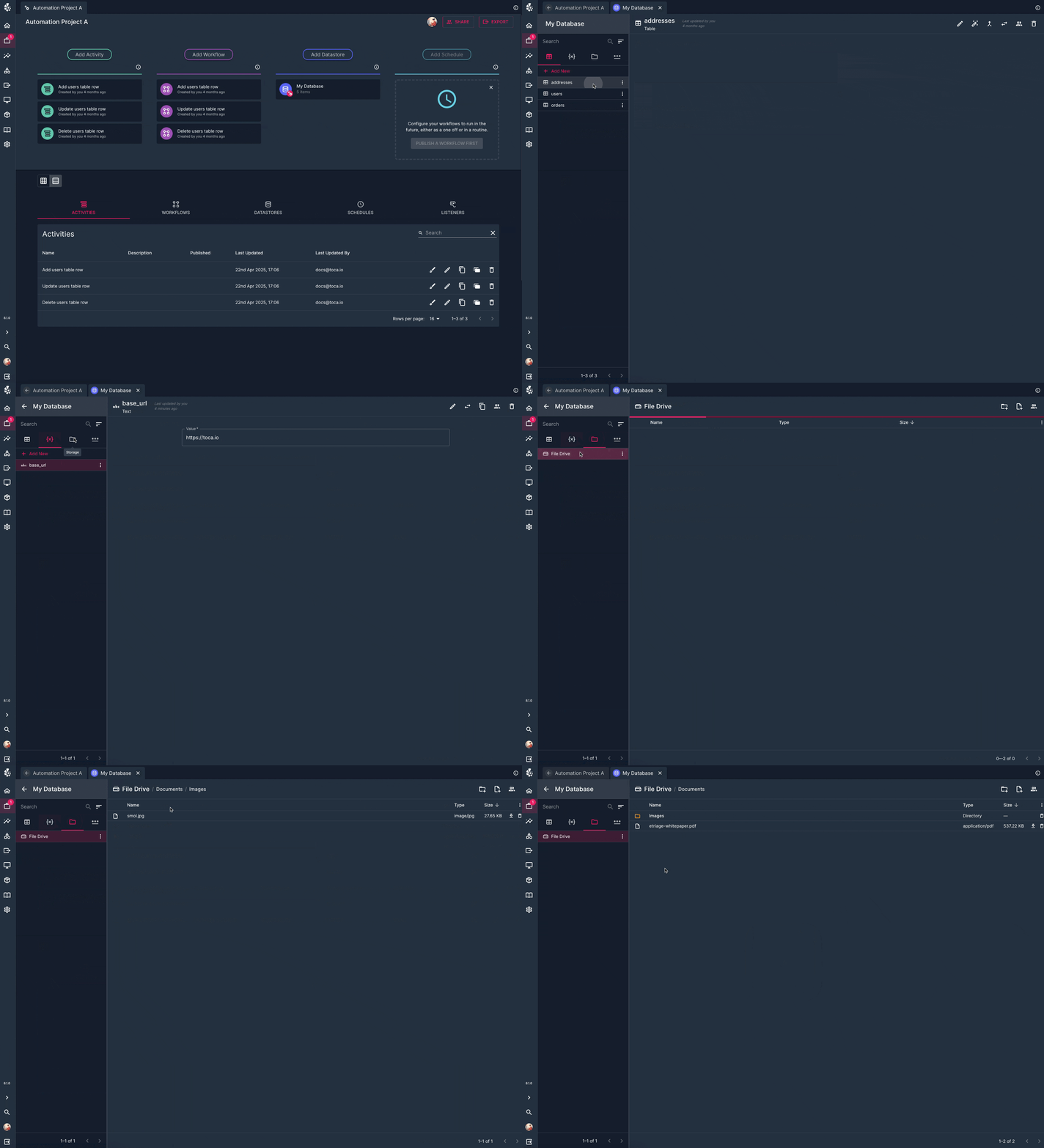
Datastores have had a makeover in version 8.1, the biggest change you'll notice is that certain variable types have now got their own sections. These sections are:
- Database - This will contain all of your table and views
- Variables - This is where your simpler variables such as strings, numbers and booleans now live
- Storage - This contains your files and, new in 8.1, directories
- Credentials - This contains passwords and identities
When you head on over to the Storage section of a Datastore, you'll notice that there is a new item inside called a File Drive. Each Datastore has it's own file drive and this is a container for files and directories, it actually allows you to build your own file system in each datastore! You can think of a file drive like a C:/ drive, it's just a storage location for you to add folders and files to!
There are new major versions of almost all of the file and folder automation actions shipped in version 8.1 which allow you to directly use a file from a datastore's file drive.
This can be very powerful when used in combination with either Stateless bots or Bot Pools when you are doing anything file related. Now you have the option to treat a datastore as shared file storage, usable by any Bot!
Usability Improvements
There are a few smaller improvements made to the automation side of the platform which should make using the activity designer much easier. These are as follows:
- Additional Action Information: If you have updated the description of an action you have placed down, you can now hover over the icon of the action to see the name of the action. You can also see the name of the action when you are editing the configuration of an action.
- View Details of Published Activities: If you are viewing the Published version of an activity, you can now inspect the configuration of each action that has been placed down in an activity.
- Variable Panel Sort and Search: The variables tab in the activity designer can now be sorted alphabetically and you can search for a variable by its name. This is especially useful if you have lots of variables defined in your activity!
- Drag multiple actions at once: You can now select and drag multiple actions at once in the activity designer, allowing you to move blocks of actions at a time.
General
Ask Tocabot - AI Documentation Chatbot
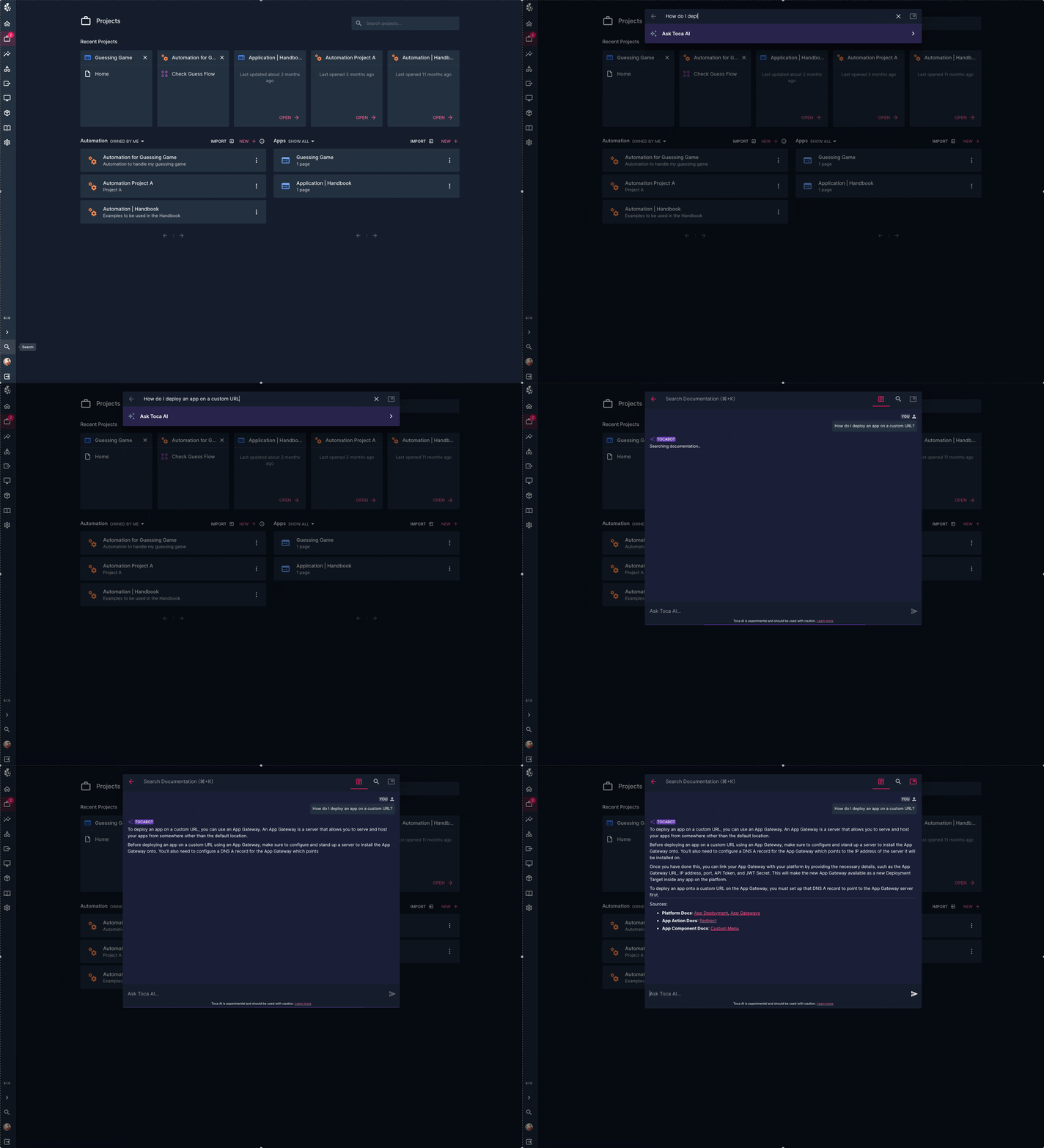
When searching our documentation, triggered by either the Ctrl/Cmd + K hotkey or by clicking the search icon in the bottom, you can now ask Tocabot, our AI assistant, a question! Tocabot is trained on all of our documentation so it can draw on all of it's knowledge to find the answer you're looking for. Tocabot also has a lot of knowledge outside of Toca too, so if you need help building a regular expression or some assistance with writing a JSONPath query, just ask!
This can be very useful as Tocabot can produce an answer that incorporates information from many pieces of documentation so rather than having to manually read and search multiple pieces of documentation to reach the answer you're looking for, Tocabot can give you a concise answer that contains all the information you need.
Platform Search
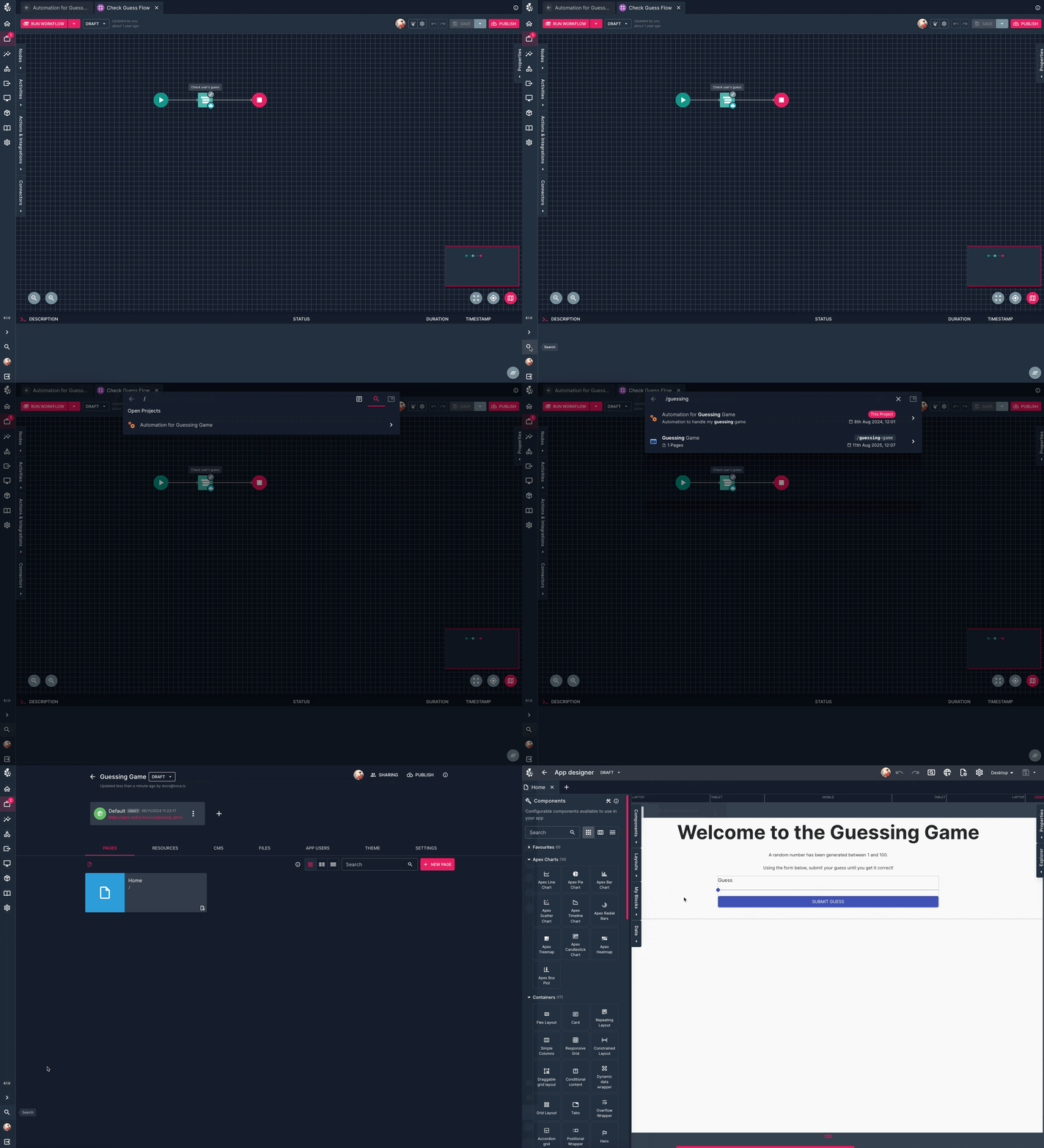
There is a new platform search function that you can access from anywhere by either clicking on the Search button in the main navbar or by using the hotkey: Ctrl/Cmd + Shift + K. This allows you to search for an entity in the platform by name or description and jump straight to it, meaning you can move between your automation and apps without taking your hands off the keyboard! This new feature allows you to search for:
- Automation projects
- App projects
- Datastores
- Workflows
- Activities
The search is typo-tolerant and will show you the results based on how close either their name or description matches what you've searched for!
Hotkeys
A number of hotkeys have been added throughout the platform, allowing you to run commands and navigate around the platform without touching your mouse. You can see a list of hotkeys on any particular page by pressing ?, this will bring up a small window in the bottom right of the screen which will show you all of the hotkeys available on the current screen. This will allow you to do things such as navigate between open tabs of an automation project, open pages of an app, run an activity, switch between viewports and preview an app all without ever leaving the comfort of your keyboard. When used in conjunction with platform search, you can seamlessly move around the platform and the speed of thought!
Handbook V1.0
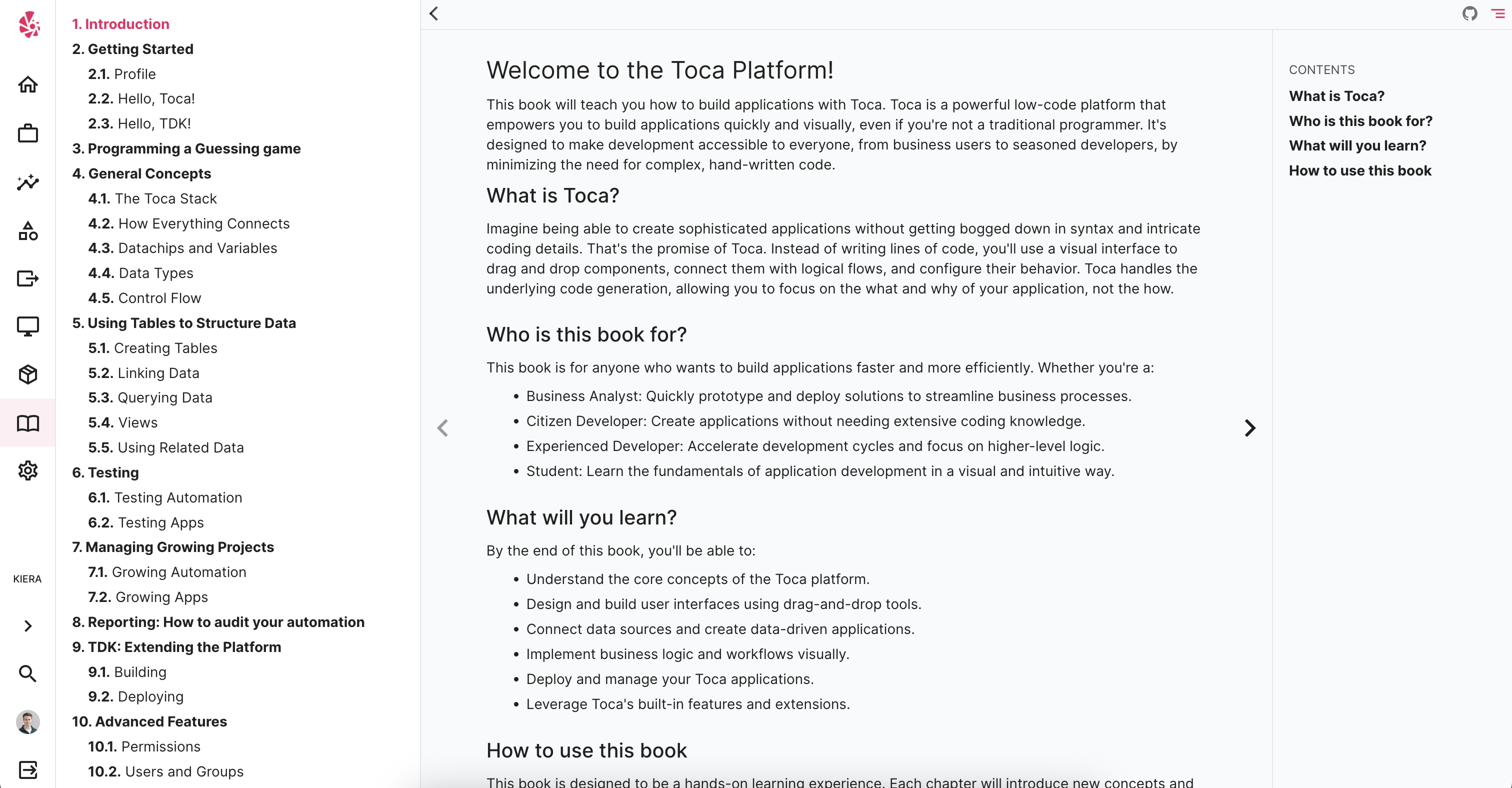
The first full version of the handbook has been released with the platform. Version 1.0 contains 10 chapters taking you through the fundamentals of the platform, all the way through to more advanced topics like using the Toca Development Kit and permissions. You can work through it chapter by chapter or you can dive in to specific articles to learn more about a particular topic. You can also search for these articles in the documentation searchbar or you can ask the Tocabot AI about content that appears in the handbook. Give it a read!
Bug Fixes
A number of bug fixes were included in this release across the platform.
Contact <support@toca.io> for a full list of bug fixes included within this release.
Deprecated
Nothing has been deprecated in this release.