Docs · Projects
Size
This property is useful to control the size of the component. The height and width properties are used to explicitly set the height and width of a component. It sets the height/width of the of the component which includes the border, padding and content of a component.
The height and width properties may have the following values:
- Automatic: Using "auto" for width and height is when you want components to be flexible and responsive to different content sizes and screen sizes. It allows the browser to handle the layout dynamically based on the content's dimensions.
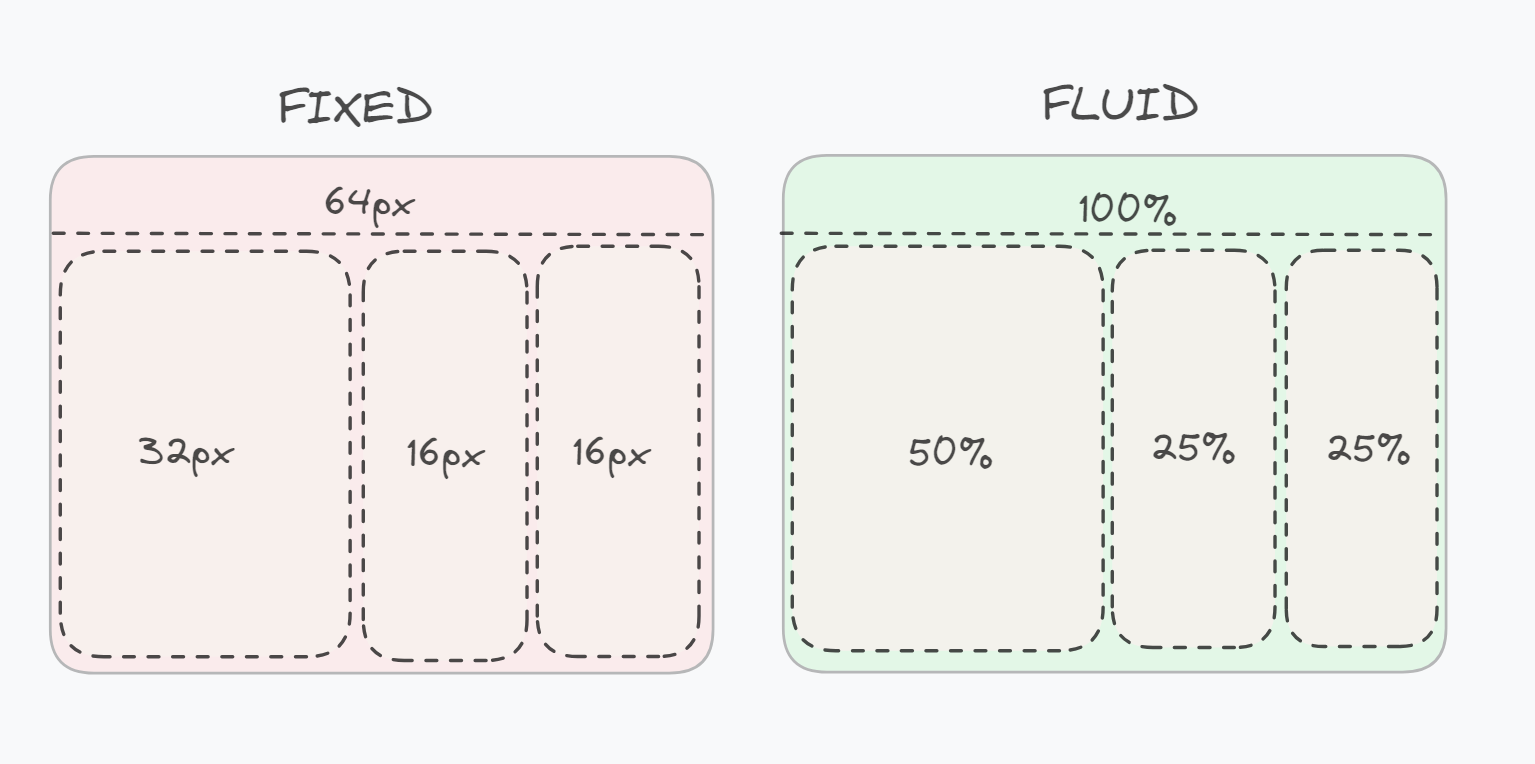
- Fluid: Fluid is a percentage, typically of whatever its parent component is. This should always work with width, but with height, it will only work when the parent has a fixed height.
- Fixed: Fixed is a hard-coded value based on the theme spacing units. A spacing unit is usually 4px
- Full width: Set to the full width of the browser window. Only available to layout components, and will only work for top-level components on a page.
- CSS: Any valid CSS value. For example
12px,1.5em,calc(100vw - 50px)etc. Numerical values will be treated as pixels.
The Minimum Height property is used to set the minimum height of a component. It prevents the used value of the height property from becoming smaller than the value specified for Minimum Height. The component's height is set to the value Minimum Value whenever the Minimum Height value is larger than the Height value.